Turn Claude or Codex into a full bookkeeping system.
wanderbooks is a free accounting engine your AI connects to. Plug it into Claude Code or Codex, the AI you already use, and you have complete double-entry books: it finds your receipts, records and categorizes everything, fixes mistakes the way an accountant would, and hands your CPA a clean package. No subscription. No account. Nothing to buy. Your books live in a folder you own.
curl -fsSL https://wanderbooks.ai/install.sh | sh -s -- ~/Books/YourCompany
One line installs everything, makes your books, and starts your bookkeeper in Claude Code. Using Codex? Add --codex to the end. Linux and macOS; Windows via WSL2.
  6100 Software & Subscriptions   Dr  59.38
  2100 Business Credit Card        Cr  59.38
Balanced, receipt attached. Software is now $1,324.69 for the year. Post it?
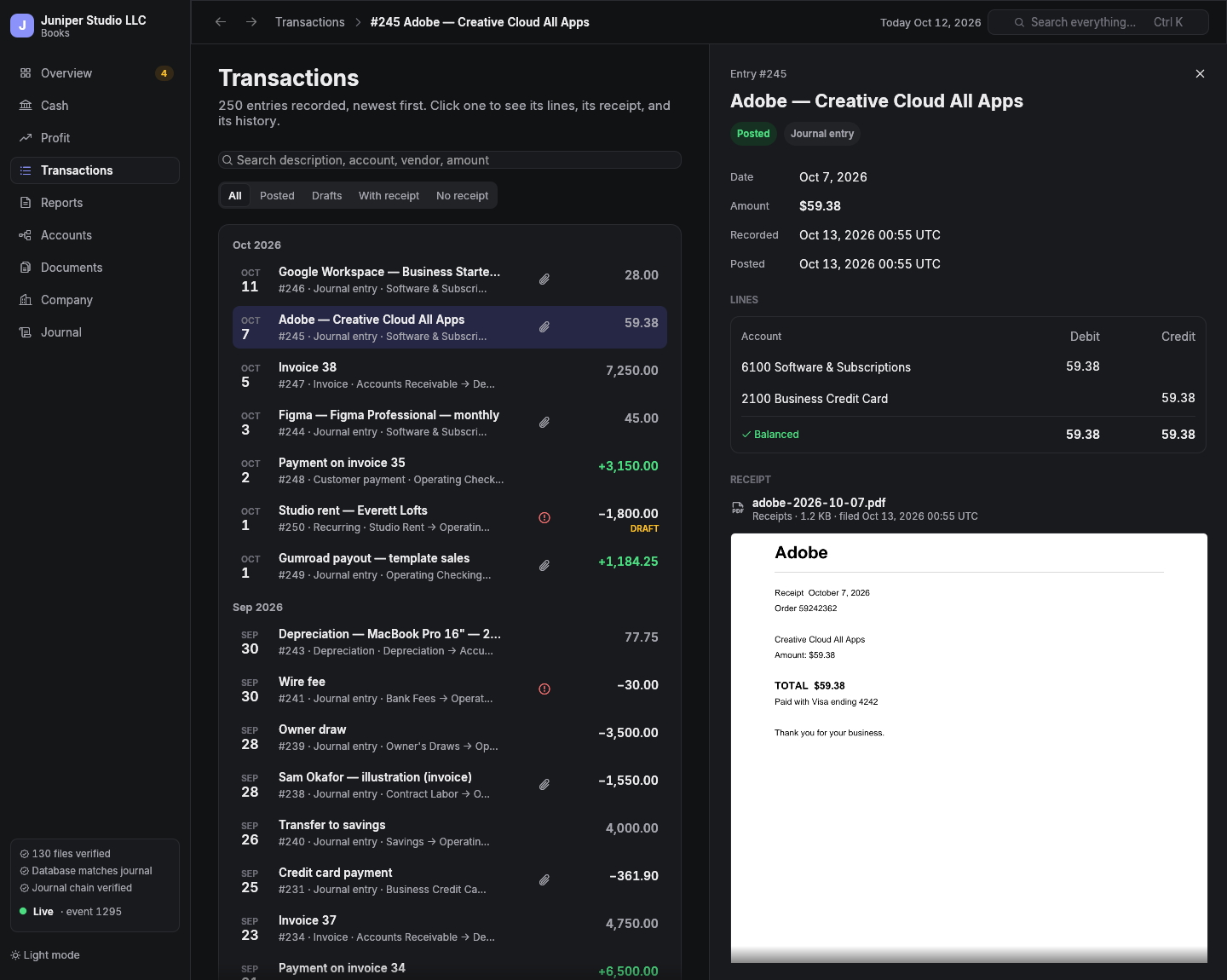
Just ask.
Your bookkeeper is the AI you already use, working through an accounting engine that won't let it be wrong. Talk to it the way you'd talk to a good bookkeeper. It does the work, shows you the result, and waits for your OK before anything is posted.
Searches your inbox, files the receipt as a PDF, drafts the entry with the right accounts, and shows you the preview.
Imports the transactions as drafts, proposes an account for each from how you've booked them before, and asks about the ones it isn't sure of.
Reverses the entry and records it correctly. Nothing is ever erased; the history shows exactly what changed and why.
Traces the number to the entries and receipts behind it, and tells you what's new.
Works it out from your actual cash, burn, and what's coming in, and shows its math.
Checks the threshold for the year, whether payments were by card, and whether her W-9 is on file.
Checks for missing receipts and unposted drafts, reconciles to your bank statement, posts depreciation and amortization, and closes the period.
Builds the CPA package: every statement, the ledgers, the tax summary, the 1099 worksheet, and every receipt, indexed.
Rebuilds your history from QuickBooks' exports and checks every statement against QuickBooks, to the cent, before you cancel.
Why not QuickBooks Online?
QuickBooks rents you access to your own financial history, raises the rent every year, and makes leaving painful. You still do the bookkeeping yourself, in forms. wanderbooks turns that around.
| wanderbooks | QuickBooks Online | |
|---|---|---|
| Where your books live | A folder on your computer, under git. Plain, documented files. | Intuit's servers. You get access while you pay. |
| What it costs | Nothing. Free and open source, forever. It runs on the Claude or ChatGPT plan you already have. | A monthly subscription per company, and the price keeps rising. |
| Who does the bookkeeping | An AI bookkeeper: receipts, entries, categories, fixes, closes. | You do, in screens and forms. Or you pay someone. |
| Receipts | Required over a threshold you set, enforced on every entry, shown right beside it. | Optional attachments. |
| Audit trail | Every change is a hash-chained event; nothing is ever edited or erased. | An audit log inside their app. |
| Leaving | Your files are the books. Standard exports any time, including QuickBooks formats. | Export what you can, and hope. |
Can it really replace QuickBooks? For most small businesses, yes. Here's exactly what you get, and what you don't (yet).
What it does
- Real double-entry books: chart of accounts, journal, general ledger, trial balance.
- Statements: P&L, balance sheet, cash flow, owners' equity; by month, quarter, or year; with comparisons.
- Invoices and bills, with receivables and payables aging.
- Tax-ready: tax categories for Schedule C, 1065, 1120-S, and 1120; a 1099 worksheet.
- The rest of a real business: fixed assets and depreciation, prepaid expenses and deferred revenue, recurring entries, platform payouts, classes, foreign-currency lines, period close, bank reconciliation.
What it doesn't (yet)
- Automatic bank feeds. Hand it your bank's CSV export or statements; it does the rest.
- Payroll processing. It records payroll you run elsewhere (Gusto, ADP), taxes and all.
- Sending invoices and taking payments. It tracks them; your payment processor collects.
- Logins for your team. Others get a read-only copy (below) or their own session with the bookkeeper.
- Point-and-click setup. Today you run one command in a terminal. After that it's plain English.
“But my CPA works in QuickBooks.”
Your CPA doesn't need QuickBooks. They need your numbers, the evidence behind them, and files their software can read. wanderbooks gives them more than a QuickBooks login ever did.
- One package, ready to send: P&L, balance sheet, cash flow, equity, and trial balance as PDF and Excel; the general ledger and journal; the tax summary.
- Every receipt behind the year's entries, indexed by entry, date, and amount.
- QuickBooks-compatible: the journal as an IIF file that imports into QuickBooks Desktop, if that's where their workflow lives.
- The 1099 worksheet, with W-9 status.
- A live, read-only view if they want to look around: share the books folder privately and they open it in the viewer. Nothing they do can change your books.
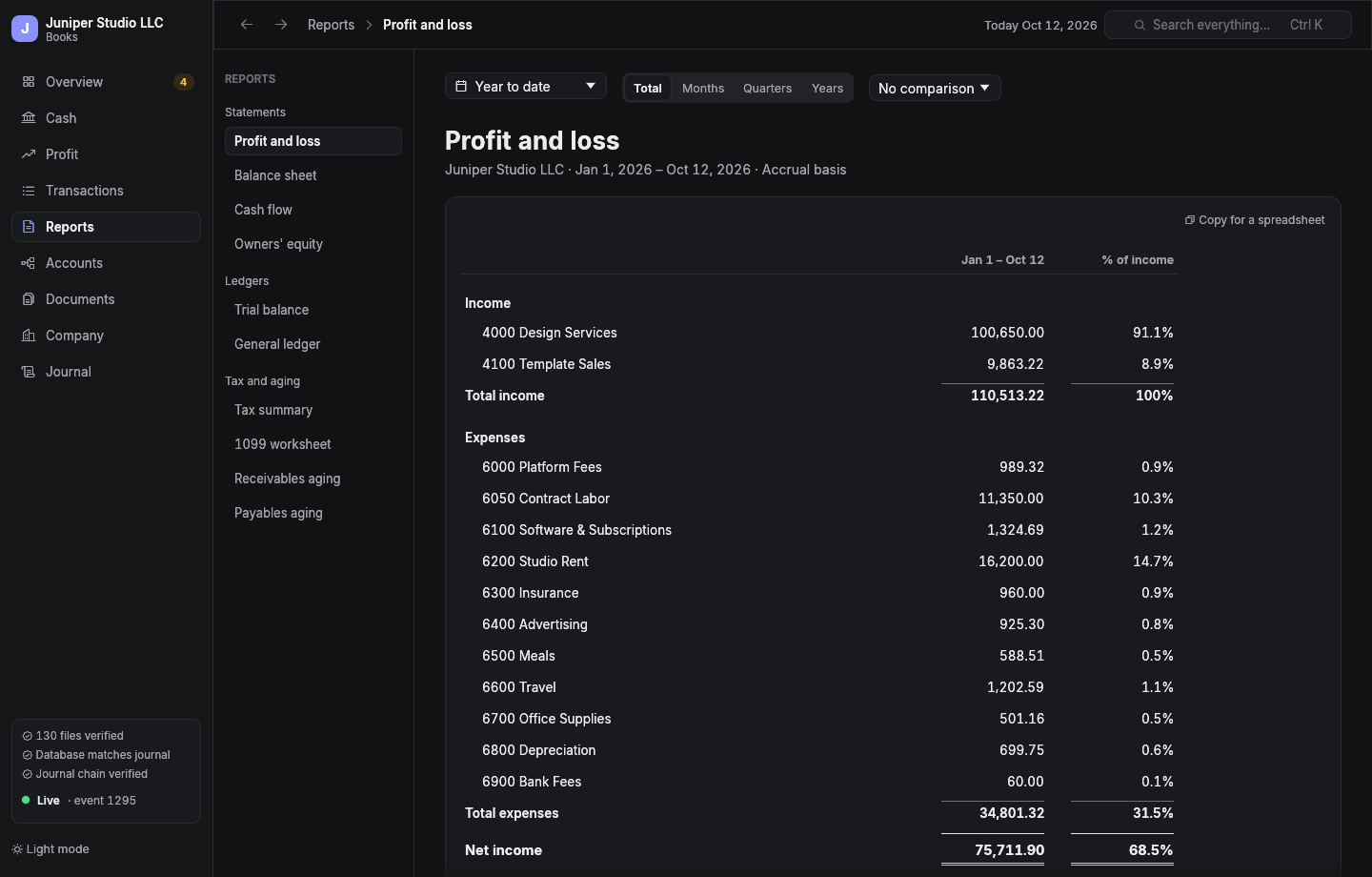
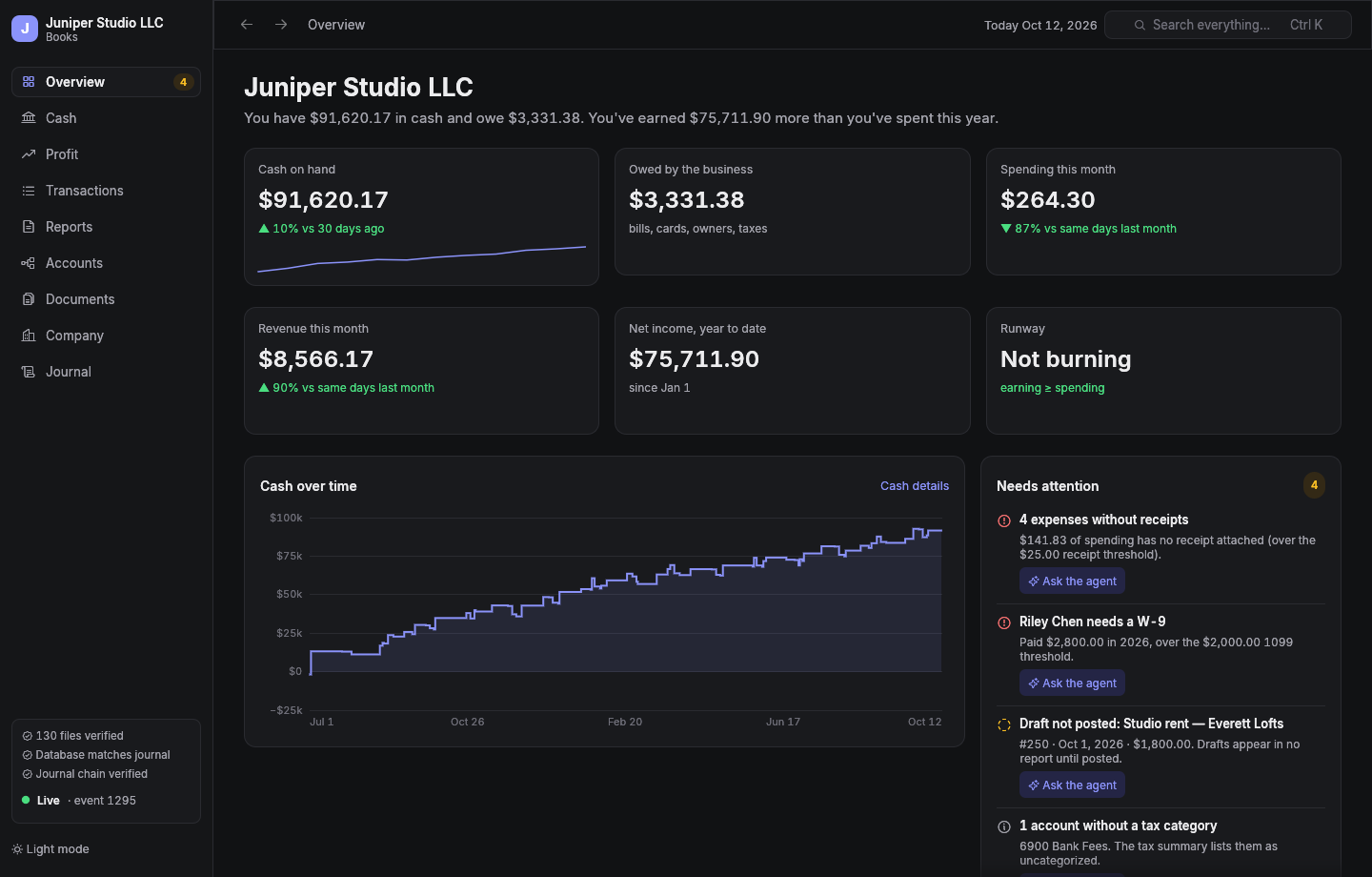
Talk to change. Look in the viewer.
Everything that changes your books happens in conversation with Claude or Codex. The viewer is the other half: a live, read-only window on the books for browsing, searching, and reports. Whatever your bookkeeper posts shows up there in a fraction of a second, and every number goes all the way down: click an amount on a statement for the transactions behind it, then a transaction for its lines, the receipt itself, and its history.
- Browse and search every transaction, account, receipt, and document.
- Reports over any dates, by month, quarter, or year, with comparisons; copy any of them into a spreadsheet.
- Answers first: cash, runway, profit, and what needs attention, in a sentence.
- Needs attention finds missing receipts, unposted drafts, overdue invoices, 1099 vendors without a W-9, and hands you the prompt to fix each.
- All the data: the full journal, every receipt and document, light and dark.
Built so you can trust it.
An AI is keeping your books, so the books have to be impossible to quietly get wrong.
The engine enforces accounting
Every entry balances exactly; money is exact decimal, never floating point. Posted entries are permanent; corrections are reversing entries. The receipt rule is enforced by the server, not left to the AI's judgment.
A tamper-evident journal
Every change is an event hash-chained to the one before. The database is checked against the journal table by table, and rebuilt if it ever drifts; every receipt is checked against its hash. The viewer shows you the result.
You approve what matters
The bookkeeper previews every posting before it happens and waits for you. The viewer can't change anything at all.
Install
The one line at the top does everything: installs Rust if you don't have it, builds wanderbooks, makes your books folder with the bookkeeper wired in, and starts a session to set up your company.
Linux
Needs a C compiler and git (build-essential on Debian and Ubuntu). The installer tells you if anything's missing.
macOS
Needs Apple's command line tools: xcode-select --install.
Windows
Run it inside WSL2 (wsl --install, then Ubuntu). On Windows 11 the viewer opens as a normal window. Native Windows is on the way.
Already installed? wanderbooks new ~/Books/AnotherCompany. In a books folder, just agent (or just codex) starts your bookkeeper and just gui opens the viewer.
Questions
What does it cost?
Nothing. wanderbooks is free and open source (MIT or Apache-2.0), with no account and no subscription. The bookkeeper is the AI you already use: Claude Code (included with Claude Pro and Max, or on API credits) or Codex (included with ChatGPT plans, or on API credits). There's nothing else to buy.
Wait, what's an MCP server?
MCP is the standard way AI tools like Claude Code and Codex plug into other software. wanderbooks is an accounting engine that speaks it: your AI calls its tools to draft entries, attach receipts, and run reports, and the engine enforces the accounting rules. The one-line installer sets it up; you never have to touch it.
Do I need to be technical?
You need to paste one command into a terminal, once. After that you talk to your bookkeeper in plain English, in Claude Code or Codex, and look at your books in the viewer whenever you like.
How does it find my receipts?
Give your AI access to your email (in Claude, an email connector like Gmail's or the Claude browser extension with your mail open) and ask. It searches for the vendor and amount, files one clean PDF per receipt, and attaches it to the entry. It asks before downloading anything, and it never types passwords or account numbers.
Where's my data, and what does the AI see?
Your books are files on your computer: a journal, your receipts, and a settings file, in a git repository you control. Nothing is uploaded to wanderbooks; there is no wanderbooks server. What your bookkeeper reads to help you goes to your AI provider (Anthropic or OpenAI), like any other conversation with it.
What if the AI gets something wrong?
Every posting is previewed before it happens. If something slips through, it's corrected the way accountants do it, with a reversing entry, so the mistake and the fix are both on the record. The engine itself refuses anything that doesn't balance, anything without a required receipt, and anything in a closed period.
Is this real accounting, or a spreadsheet with an AI on top?
Real double-entry accounting, with the rules enforced in code: exact decimal money, balanced entries, immutable posting, closes, depreciation, accrual or cash basis. Its statements are tested against hand-computed numbers, golden files, and property tests.
Can I bring my history from QuickBooks or a spreadsheet?
Yes. Export your chart of accounts, journal, and reports, and ask your bookkeeper to move you over. It rebuilds the history and compares every statement against the old system, to the cent, before calling it done. Keep the old system read-only until you've closed a month in wanderbooks.